

Maternity photography captures one of the most emotionally significant moments in a woman’s life. These images are not just portraits. Professional maternity photo editing preserving how the moment felt: calm, confident, feminine, and timeless. As a professional photo retoucher working with maternity photographers, I try to enhance the emotion without ever making the image look edited.
My maternity retouching workflow on one example of natural, soft, basic editing level.
1. Light and atmosphere
I adjust white balance, contrast, and shadow transitions in Adobe Camera Raw to create soft, flattering light. Maternity portraits often benefit from warm tones and gentle highlights that emphasize serenity rather than dramatic contrast.
2. Silhouetting the body and dress
Ethical maternity retouching respects the natural form. I never alter body proportions. Instead, I refine fabric lines, posture balance, distracting folds, and garment flow, using the Liquify tool in Photoshop.
Careful retouching helps smooth wrinkles caused by movement, refine fabric shapes, and enhance elegance without looking staged. Think of it as couture finishing rather than digital manipulation.
3. Natural skin retouching
Pregnancy hormones can cause temporary redness, uneven tones, or small blemishes. Professional retouching removes distractions while preserving real skin texture, natural pores, luminous highlights, and authentic softness.
The goal is glowing skin, not plastic smoothing. I also pay big attention to the skin tone, making it nice and healthy, using the Hue/Saturation layer in Photoshop.
4. Removing distractions
I always remove small imperfections from the background, spots on the dress or flyaway hair. Inaccuracy ruins the atmosphere.
5. Finishing touch
Finally, I refine the artistic atmosphere depending on the photographer’s style, making cohesive color harmony. Also, I sharpen the image a bit. These small adjustments elevate the image while remaining invisible.
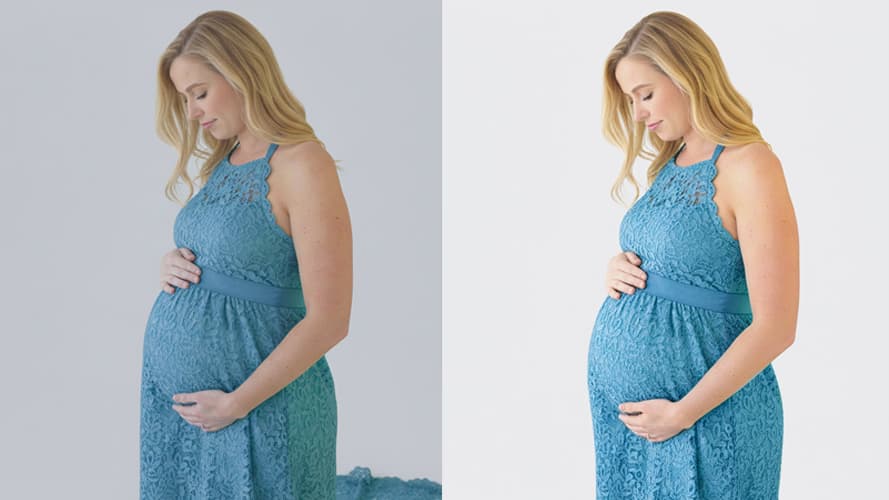
What changed after professional retouching?
I help refine light and atmosphere, maintain natural skin texture, highlight the maternal silhouette, remove visual distractions, and preserve authenticity. A well-retouched maternity portrait should never announce itself as photoshopped. Instead, it should feel like memory: graceful, calm, and fully present.
When should you outsource and choose professional retouching support?
Many maternity photographers outsource editing during busy seasons to maintain consistent quality, reduce post-production time, focus on clients and shooting, and deliver galleries faster
Retouching becomes a creative partnership, not just a technical service. The best editing is invisible. It simply allows emotion to remain the focus, and I can help you with this. Please visit my Portfolio page or fill in the Form to get a custom quote, and I would be glad to cooperate.